2003 Acura MDX Speaker Sizes and Audio System Guide
2003 Acura MDX Speaker Sizes and Audio System Guide
Save this audio guide to your Ownery garage
This page summarizes the factory speaker layout for the 2003 Acura MDX and highlights what to check before choosing upgrades. Equipment can vary by trim, body style, or audio package, so the exact setup may differ from one vehicle to another. Use this guide to understand speaker locations, factory audio notes, and where optional equipment such as tweeters or a subwoofer may be fitted if equipped.
Data verified by Nick Marchenko, PhD
Speaker Size Chart – 2003 Acura MDX
Use this table as the main reference. Fitment depends on trim, factory audio package, mounting depth, and adapter availability.
| Location | Type | Factory Size | Note |
|---|---|---|---|
| Front Door | Tweeter | 2 inch | if equipped |
| Front Door | Full-Range | 6.5 inch | |
| Rear Door | Full-Range | 6.5 inch | |
| Far-Rear Side Panels | Subwoofer | 10 inch | if equipped |
| Overhead | Mid-Range | 2.5 inch |
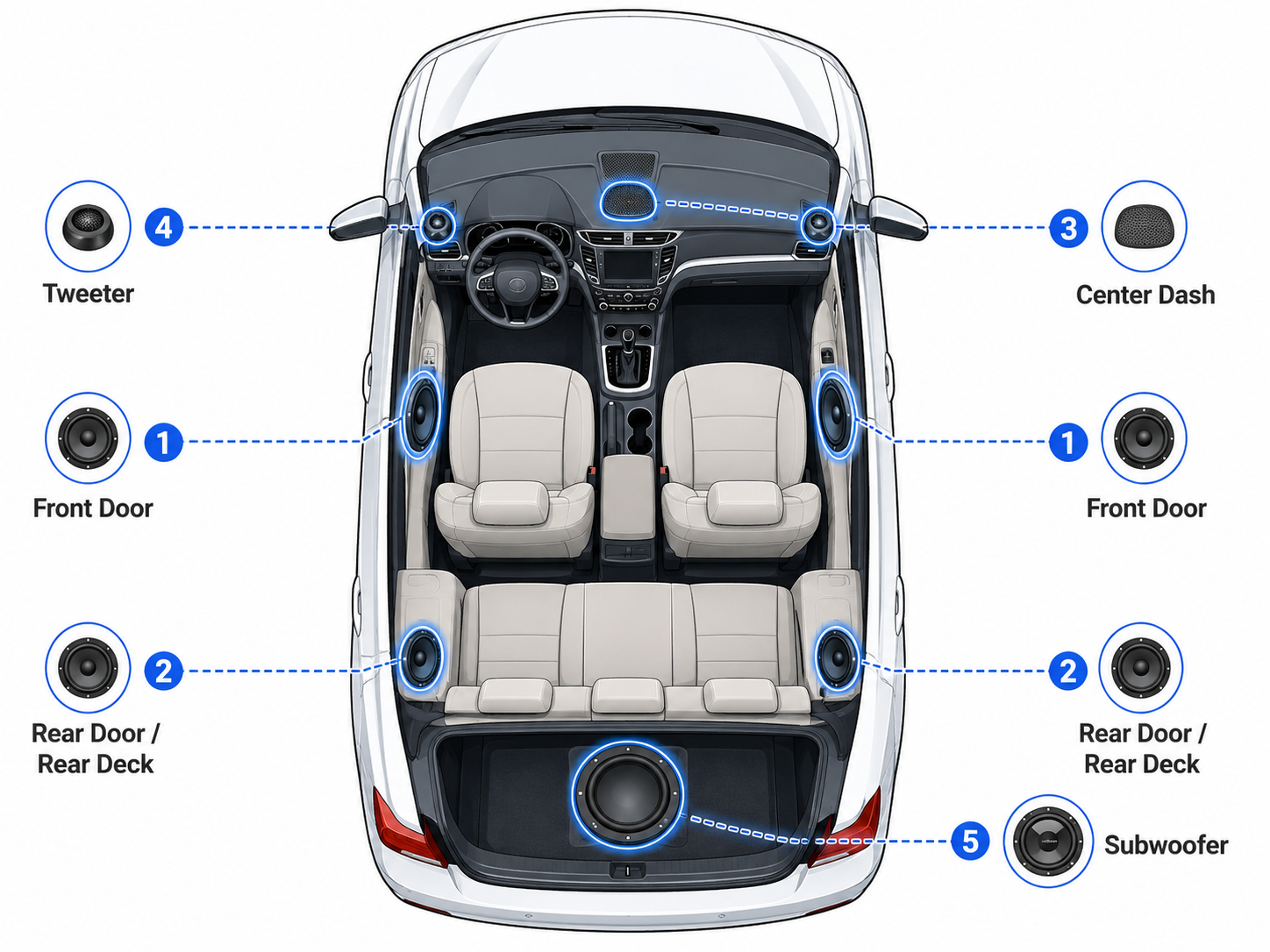
Generic speaker location diagram. The table above shows the specific factory sizes for this vehicle. Exact location details may vary by body style and trim.
Speaker Count by Trim – 2003 Acura MDX
Speaker count and audio equipment vary by trim and factory audio package. This table lists known configurations from our database.
| Trim | Speakers | Amplifier | Radio | Navigation |
|---|---|---|---|---|
| 3.5L 4dr 4x4 | 7 | – | – | – |
Data sourced from manufacturer specifications. Verify with the window sticker or dealer before ordering audio components.
Vehicle and Audio System Specifications
This block helps identify the vehicle and its audio system configuration for fitment decisions.
Crossover vs SUV – Audio Differences
This model is listed with multiple body styles, but body-style-specific speaker data is not available. That means rear speaker placement, subwoofer availability, and other factory audio details can vary by configuration. Front and rear door speaker locations are documented, while factory amplifier details should be verified by trim and audio package.
What Speakers Fit the 2003 Acura MDX?
Aftermarket fitment should start with the factory speaker locations listed above, but diameter alone is not enough. Check mounting depth, bracket fit, connector type, and whether the vehicle has a premium or factory-amplified audio system. This 2003 Acura MDX uses 6.5-inch full-range speakers in the front and rear doors, plus a 2.5-inch overhead mid-range location. If equipped, the front door tweeter and far-rear side panel subwoofer should also be matched to the correct opening and system layout.
Usually Safe Upgrades
- If your vehicle uses the front door 6.5-inch full-range location, start with speakers built for that size and confirm depth before buying.
- If your vehicle uses the rear door 6.5-inch full-range location, choose replacements that match the factory opening and connector style.
- If your vehicle uses the front door tweeter location, make sure the replacement matches the 2-inch opening if equipped.
- If your vehicle uses the overhead 2.5-inch mid-range location, verify the speaker diameter and mounting style before ordering.
- If your vehicle uses the far-rear side panel subwoofer location, confirm the 10-inch size and whether your audio package includes it.
Check Before Buying
- Measure mounting depth and compare it with the replacement speaker before purchase.
- Confirm whether the vehicle has the optional tweeter or subwoofer locations if you plan to replace those speakers.
- Check the connector type and mounting pattern so the new speaker matches the factory opening.
- Verify the audio package and trim level, since factory amplifier details should be checked by trim and equipment.
Installation Notes
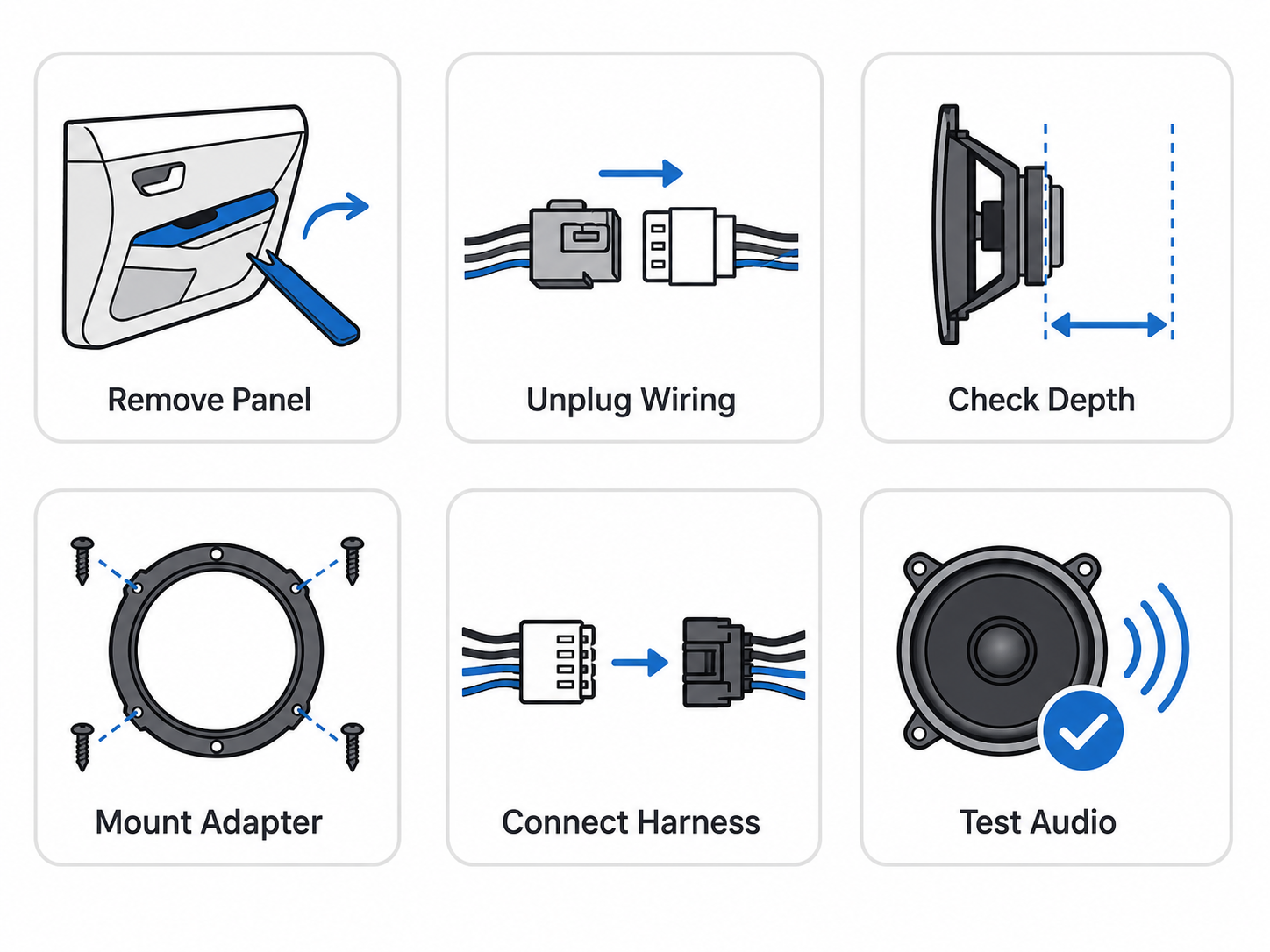
The 2003 Acura MDX uses a mix of speaker locations, so it helps to confirm what is in the vehicle before ordering parts. The front doors use 6.5-inch full-range speakers, and the front door tweeters are 2 inches if equipped. The rear doors also use 6.5-inch full-range speakers, while the overhead location uses a 2.5-inch mid-range. If your vehicle has the factory subwoofer, it is listed at 10 inches in the far-rear side panels. During installation, remove the door and trim panels carefully to avoid breaking clips or scratching the panels. Check speaker depth before mounting new speakers, especially in the front and rear doors, since clearance can vary by speaker design. Mounting adapters may be needed to match the factory openings, and harness adapters can help keep the wiring clean and reversible. Be careful with polarity when connecting the new speakers, and test each location before fully reassembling the panels. Factory amplifier details should be verified by trim and audio package.
Moderate difficulty, since panel removal, wiring checks, and fitment verification are important for a clean installation.
Common Mistakes When Replacing Speakers
When shopping for 2003 Acura MDX speaker upgrades, the biggest errors usually come from assuming every vehicle is wired the same and skipping fitment checks that matter.
- Buying based only on the body-style label instead of checking actual speaker locations on the vehicle.
- Ignoring trim and audio package differences, since factory amplifier details should be verified by trim and audio package and speaker count can vary by equipment.
- Assuming the front door tweeters are always present, when they should be treated as if equipped.
- Overlooking the far-rear side panel subwoofer if equipped, which can change the parts you need and the way the system is wired.
- Skipping mounting depth and connector checks before ordering, which can lead to parts that do not match the opening or factory plug style.
- Reassembling everything without testing the speakers first, which can hide wiring or polarity problems until the job is already finished.
Generation & Model Family
The 2003 Acura MDX belongs to the First generation (YD1) (2001–2003) family. Nearby model years often share similar speaker locations and audio layouts, but exact fitment can vary by trim and audio package – verify before ordering.
Recommended Upgrade Path
The 2003 Acura MDX uses a 7-speaker setup in the listed trim, and equipment can vary by audio package. A smart upgrade plan starts with the front stage, then moves to bass and system power if you want more output. Factory amplifier details should be verified by trim and audio package before adding any amplification.
| Goal | Best Upgrade Path | Why |
|---|---|---|
| Better clarity | Upgrade the front door full-range speakers first, then add front tweeters if equipped to improve detail and stereo imaging. | The front speakers do most of the work for vocals and instruments, so improving that area usually gives the clearest change in sound quality. |
| More bass | If the factory subwoofer is equipped, consider replacing it with an aftermarket subwoofer solution and confirm enclosure and system compatibility before adding bass power. | A stronger bass upgrade can add low-end impact without relying only on the factory speakers, but the existing subwoofer setup should be checked first. |
| Louder sound | Properly matched speakers and amplifier integration can improve volume and reduce distortion. Verify factory amp or premium system integration before adding aftermarket amplifiers. | Higher output works best when the speakers and power source are matched correctly, which helps keep the sound clean at higher volume. |
| Budget improvement | Replace the front door speakers first using same-size replacement speakers with correct mounting brackets. | The front doors are the most-used speakers in the system, so this is usually the most cost-effective place to start. |
| Factory look | Use same-size replacement speakers with the correct mounting brackets and harness adapters for a clean install that preserves the factory wiring and appearance. | This approach helps the upgrade blend in while keeping the interior looking close to stock. |
Mounting Adapters and Wiring
The same nominal diameter does not guarantee a direct mount. Before ordering, confirm:
- Speaker depth: Aftermarket speakers often have larger magnets – measure available depth at each location.
- Mounting brackets: Door locations typically need a bracket or spacer to clear the window regulator and achieve correct mounting depth.
- Wiring harness adapters: Use a plug-and-play harness adapter to preserve factory wiring.
- Tweeter mounting cups: Replacing OEM tweeters may require surface-mount cups or brackets depending on the location.
- Factory or premium amplified systems: If the vehicle has a premium or factory-amplified audio system, confirm how the factory radio, amplifier, and speakers are connected before adding aftermarket amplifiers. Depending on the setup, a line output converter, DSP, integration harness, or professional installation may be needed.
- Connector type: Factory connectors vary by trim and model year – confirm compatibility before splicing or using an adapter.
Frequently Asked Questions
What size are the front door speakers in a 2003 Acura MDX?
The front door full-range speakers are 6.5 inches. Front door tweeters are 2 inches if equipped, so verify the audio package before ordering parts.
What size are the rear door speakers?
The rear door speakers are 6.5-inch full-range units. This size is listed directly for the 2003 MDX.
Does the 2003 Acura MDX have a factory subwoofer?
A 10-inch subwoofer is listed in the far-rear side panels if equipped. Subwoofer availability may depend on the trim or audio package.
Do I need mounting adapters for speaker replacement?
Mounting adapters may be needed depending on the speaker location and the replacement speaker design. Check the factory opening and depth before choosing parts.
Can I replace the speakers without replacing the radio?
Yes, speaker replacement can be done without changing the radio in many cases. Radio and navigation equipment vary by trim, so confirm the system before starting.
Does the 2003 Acura MDX have a factory amplifier?
Factory amplifier details should be verified by trim and audio package. The available trim data lists amplifier information as N/A.